Regex vs Structural Search for Large Codebases
Structural search finds code constructs; regex finds text patterns.

Regex operates on a flat stream of characters. It has no concept of programming language grammar, no notion of scope, and no access to an abstract syntax tree. When a regex engine matches a pattern, it does character-by-character comparison against a sequence of bytes; it does not know, and cannot know, whether the text it just matched is a function call, a comment, or a string sitting inside a log message.
That sounds like a limitation, and in some contexts it is. Regex persists anyway, and the reason is simple: grep, ripgrep, and the find-in-files box in every major IDE all speak regex, so there's no tooling investment required to start using it. Regex excels at literal token matching: a specific error code, a TODO comment, an identifier wherever it turns up. It scans large volumes of text at predictable speed, and it works across file types simultaneously, config files, logs, documentation, without needing a language parser standing behind it.
Regex is built for one job: finding textual patterns. The trouble starts when engineers ask it to do a different job entirely. Most of them do, because regex is the tool they already know, and familiarity gets mistaken for fitness constantly.
Where regex breaks down in a large, multi-language codebase
Scale exposes what regex can't see. A search for a function name returns every occurrence of that string: in comments, in test fixtures, in variable names that happen to share the text, in generated code nobody's opened in months. None of that is a call site, but regex can't tell the difference, so the engineer has to, one result at a time.
Formatting variation makes it worse. A regex written to match a function call with three arguments breaks the moment someone wraps those arguments across multiple lines, adds a trailing comma, or the linter reformats the file on save. Write the pattern precisely enough to cut the noise, and it turns brittle against every contributor's formatting habits. Write it loosely enough to survive those differences, and the noise comes right back.
Then there's scope, and this is the one most engineers underestimate. Regex cannot distinguish a local variable named config from a global constant with the same name; every occurrence looks identical to a character-matching engine, because as far as regex is concerned, they are identical. Add a second or third language to the repository, and a pattern tuned for Python semantics starts misbehaving, silently, against TypeScript or Go files sitting in the same directory tree.
This is where the failure mode turns from annoying to dangerous. During a refactor or a security audit, a missed call site because of an unexpected line break isn't a productivity nuisance; it's a correctness failure that ships to production. Regex gives no warning when this happens. It returns results with total confidence whether those results are complete or not, and nothing in the output flags what got missed. The silence is the real cost, and it's the part most teams never budget for.
What structural search is actually doing differently
Structural search parses source code into an abstract syntax tree and matches against the shape of that tree, not the sequence of characters in the file. A query for "calls to function X with argument Y" matches the call regardless of whitespace, line wrapping, or a comment sitting between the tokens, because the parser strips that noise out before the matching even starts.
This buys scope awareness for free. A structural search tool can tell a method definition from a method call, or a type annotation from a variable binding, because those are different nodes in the tree, not just different arrangements of the same characters. Metavariables, wildcards that bind to any syntactically valid expression, let an engineer write "find any call to this function with any argument" without enumerating every formatting variant a regex would need to cover the same ground.
Semgrep matches patterns against ASTs. Comby does structural matching with a syntax simpler than a full AST query language. Some code intelligence platforms build structural search modes directly into their indexing layer. The common thread, once you look closely: the parser has to know the language. That's the source of the power, and, as the next section makes clear, the source of the constraint too.
Regex tracks what code looks like on the page. Structural search tracks what code means, syntactically, and engineers who treat the second as a fancier version of the first are making a mistake that costs them precision later.
Where structural search has its own limitations
Language support is the first wall a team hits, and it's a hard one. A parser has to exist for the language before structural search works on it at all. Polyglot codebases tend to have strong support for the primary language and thin or absent support for whatever secondary languages crept in over the years, a bit of Lua here, some generated protobuf code there.
Query complexity is the second wall. Structural matching handles single-pattern, single-function questions well, but it strains the moment a question involves multi-step dataflow or a pattern spanning several functions, the kind of question that actually calls for static analysis rather than syntactic matching. Structural search sits above regex in what it can express, but it is not static analysis. Treating it as though it tracks values across function boundaries is a category error, and engineers make it constantly.
There's a learning curve too, real even where the query syntax is simpler than a hand-built regex. Teams that want structural search wired into CI or code review have to make tooling decisions that "just run grep" never required of anyone.
Performance is the quiet catch nobody budgets for. On a very large repository, an unindexed structural search tool that parses files on demand can run slower than ripgrep scanning the same files as plain text. Whatever precision structural search holds over regex evaporates fast if the indexing strategy behind it isn't solid.
Configs, markdown, and log files are a different story. For anything that isn't code, structural search either doesn't apply or needs a separate tool entirely. Regex stays the default there, and no amount of AST tooling changes that.
The decision framework: matching the search type to the question being asked
The question worth asking isn't "which tool is better." It's "what kind of question is being asked about the codebase." That reframing does most of the work, and skipping it is the actual mistake, more than any misuse of either tool on its own.
Reach for regex when the target is genuinely textual: a literal string, an error code, a TODO comment, anything that isn't a semantic construct in the first place. Reach for it when the search has to span file types, code and config and logs together, or when speed of writing the query matters more than precision, the way it does during early, exploratory digging rather than an audit. And reach for it when no language-aware parser exists for the files in question, because at that point structural search simply isn't on the table.
Reach for structural search when the question names a specific language construct: every call site of a function, every instantiation of a class, every usage of a deprecated API. Reach for it when correctness outweighs speed of authoring, which is most of the time during refactors, security reviews, and deprecation tracking. And reach for it when the codebase has enough formatting inconsistency that covering the same syntactic pattern with regex would take a dozen variants to match what one AST query catches cleanly, or when the goal is capturing what matched, not just confirming that something did, since that's what metavariable binding is built for.
Neither tool alone is the right habit, and picking a permanent favorite is a worse mistake than misusing either one occasionally. The strongest pattern in practice runs regex first to narrow scope, which files, which modules, which services touch a given string, and then runs structural search inside that narrowed set to find the exact construct. That combination beats either approach used in isolation on a large codebase, because it plays to what each tool actually does well and skips what neither does well alone. For ongoing work, deprecation campaigns, security audits, architecture migrations, the structural pattern that found the issue once should get saved as a query or wired into CI. A one-off search that isn't preserved is a search a team will run again from scratch in six months.
How search tooling at the platform level changes what's practical for a team
Neither regex nor structural search means much without an indexing and interface layer sitting above the raw capability. On a codebase spread across many repositories, running grep locally, repo by repo, or juggling a separate structural search tool for each language, stops being practical well before a team notices it's happened.
A code intelligence platform changes what's on the table in a few concrete ways. A unified index across every repository, which tools like Sourcebot, a self-hosted code search platform, provide on-premises, means engineers search the whole codebase, not just whatever happens to be checked out on a laptop that morning. A single interface for both regex and structural queries means teams aren't running two separate tooling pipelines for two separate search philosophies. Persistent, shareable search links mean a structural query that surfaced a vulnerability can get pasted into a ticket and reproduced by anyone on the team, instead of retyped from memory and inevitably slightly wrong the second time. Natural-language search exposed on top of the index means a product manager or a support engineer looking for where a feature flag lives doesn't have to learn regex or AST query syntax first.
Self-hosting matters more than it might seem for organizations with sensitive source code. Sending that code to an external service to get structural matching is a tradeoff plenty of enterprises won't accept, full stop. That's why the index and the query engine need to live inside the organization's own infrastructure rather than someone else's.
AI coding agents raise the stakes on the same problem, and this is where the scope limitation stops being an inconvenience and starts being a correctness risk at machine speed. An agent that only sees files checked out locally runs into the identical wall a developer hits running grep from a single repo. Without a full-codebase index behind it, an agent's regex and structural queries alike return a partial picture. Partial pictures are exactly what produce confident, wrong answers, delivered faster than a human would have delivered them.
Putting the framework into practice on a real codebase migration scenario
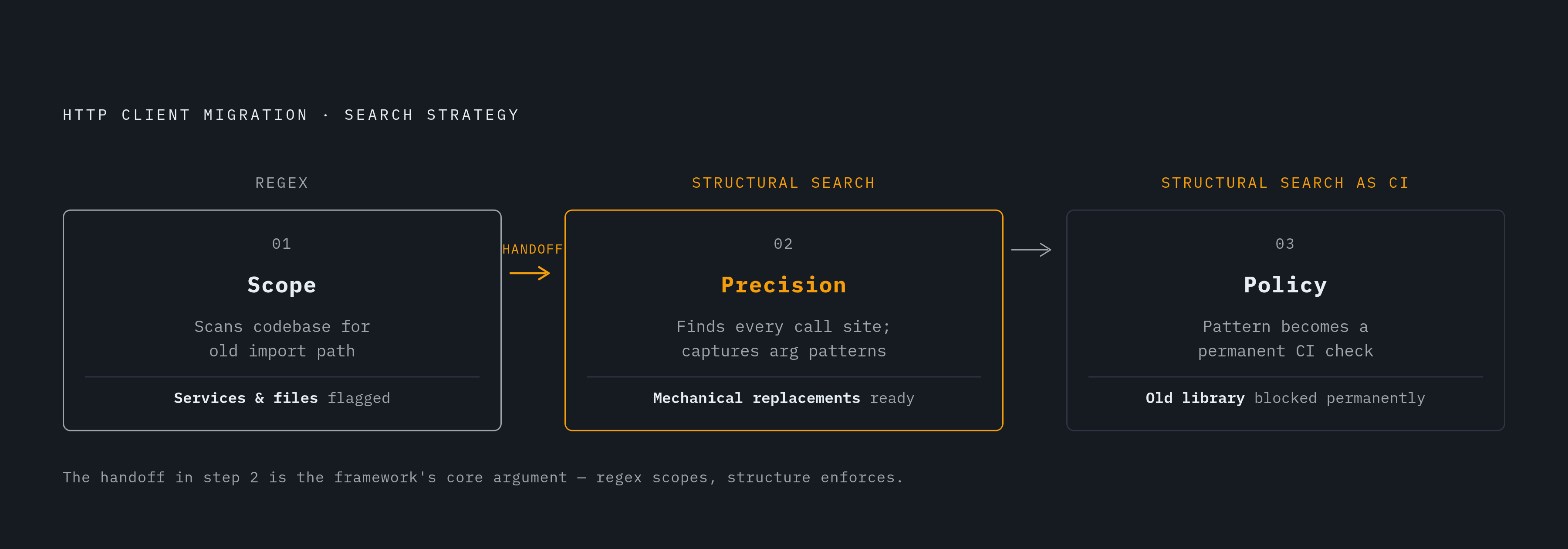
Consider a team migrating off a deprecated internal HTTP client library, replacing it with a new one across a large, multi-service codebase. This is the scenario where the framework earns its keep, step by step.
Step one is scoping, and regex is the right tool for it, because the question at this stage is textual, not syntactic. Search for the import path or package name of the old library across the entire codebase. No syntactic awareness is needed, just a literal string that needs to turn up wherever it exists, regardless of language or file type. This step tells the team which services and files are even in scope for the migration.
Step two is precision, and that's where structural search takes over completely. Within the files regex flagged, structural queries find every call site of the specific deprecated methods, capturing the argument patterns at each one so the migration can be applied mechanically rather than by hand, one call site at a time. Regex stumbles badly here: reformatted call sites slip past it, and string literals that happen to contain the method name generate false positives that need manual triage nobody has time for.
Step three turns the one-time search into a permanent policy. The structural pattern that found the deprecated usages becomes a CI check, blocking the old library from creeping back into the codebase once the migration finishes. A regex-based check would need constant upkeep as formatting conventions shift; a structural check tolerates formatting changes without modification, which is exactly why it belongs in CI.
Nothing in that sequence pits the two approaches against each other. Regex handles discovery, structural search handles precision, and structural search does double duty as the long-term guardrail. The same sequence maps onto security audits (find every file touching a vulnerable dependency, then find the exact call patterns inside them) and onto onboarding documentation (find where a concept lives in the codebase, then find every place it's used). The habit worth building, across all of it, is asking whether the question at hand is a text question or a syntax question before a single query gets written. Skip that step, and the tool doesn't matter; the results will mislead either way.